
Instant QR verification
Every record gets its own QR code and a clean verify link. Anyone can scan and confirm the credential in seconds — no login, no app.
Attestra turns WordPress into a credential authority. Issue certificates, licenses and compliance records, then let anyone confirm they're authentic in under a second — scan the QR code, type the ID, or just upload the certificate itself. No accounts, no email chains, no flat PDFs.
Advanced Data Analytics — Cohort 14
Attestra covers the whole life of a document — creating it, delivering it, proving it's real, and retiring it when it expires.
Every record gets its own QR code and a clean verify link. Anyone can scan and confirm the credential in seconds — no login, no app.
Hand over the certificate instead of typing an ID. PDF, JPG or PNG — even a photograph of a printed one. A built-in QR reader works out which credential it is, then checks it against your register.
Certificates are drawn at print resolution and offered in whichever format the holder needs, straight from a verified result or from your admin.
Not every credential needs generating. Upload a signed licence, an awarding body’s own artwork or a scan of something printed years ago, drag the QR code onto a clear part of the page, and issue it as it stands. The original is kept untouched — the code goes on a copy.
An inspection report or a multi-page licence stays whole. Every page is kept and downloaded, the verification page turns through them one at a time, and the code can repeat on every page for a report whose sheets get separated.
Set up a cohort once — a class, an intake, a round of renewals — paste in the names, and issue, download, email or rebuild the whole group together.
Upload hundreds of records at once. Map your spreadsheet columns to custom fields, and add a batch column to split one file across several cohorts.
Set an expiry date and records flip to Expired on their own. Keep them public as proof of history, or hide them from search entirely.
Show a reduced-resolution copy while the print-resolution original stops being reachable by any address. Right-click and dragging are blocked too — a deterrent, not a guarantee.
Rename the admin menu, set your own accent colour — or let Attestra read it from your theme — and hide the plugin from every administrator but you. Your clients only ever see your build.
Build the fields your credential actually needs — grades, license classes, serial numbers, cohorts — and reuse them across categories.
Each category builds its IDs from a pattern you set — a prefix, the year, a running number — so the register reads the way your own numbering already does. Once issued, an ID never changes.
A branded verification page on your own domain. Employers and clients search by ID and get a clear answer in your layout, not ours.
The lookup form reads your accent colour from your page builder or theme and follows it, and the shortcode drops into Elementor, WPBakery, Divi or the block editor like any other element.
Every edit after publication is logged with a timestamp and shown on the verification page, so a record tells the truth about its own past.
Issued, expiring, withdrawn, verified — all on the screen you open first, with the checks people ran on them counted alongside.

Watch each stage run. Pick a step to jump straight to it.
If your workflow has a unique ID and someone on the other end needs to trust it, Attestra fits.
Diplomas, transcripts and course completions employers can check themselves.
Guard certifications, weapons permits and background clearances with instant lookup.
Auto-generated license keys and PDF certificates for SaaS and product buyers.
VIP passes, speaker badges and membership cards with QR check-in at the door.
Test results, immunisation logs and professional training records, kept private by ID.
Permits, civic awards, business registrations and compliance badges with public proof.
Internal compliance docs, ISO audit achievements and partner authentication.
Product warranty cards and lucky-draw winner lookups anyone can confirm.
Coordinators, registrars and IT managers who run Attestra on their own WordPress sites.

Attestra has made certificate verification much easier for our team. The QR verification gives recipients a simple way to prove that their credential is genuine.

We wanted to keep everything inside our WordPress website, and Attestra was a great fit. The setup and day-to-day management are straightforward.
The certificate templates are really useful. Once we created our design, Attestra handled the recipient information and QR code automatically.

Our previous verification process involved manually checking records. Attestra has significantly reduced that workload.

The public verification page is probably the most useful feature for us. Employers can check a certificate without having to contact our office.

I like that credentials remain properly recorded even when their status changes. It gives us a much clearer history of what happened.

Attestra has helped us move away from sending certificates as simple PDF files. Each credential now has a verification record behind it.
The dashboard is clean and easy for our staff to understand. We can manage credentials, categories, and templates without needing technical knowledge.

We issue certificates regularly, so having automated certificate generation has saved our team a lot of repetitive work.
The QR verification is a simple feature, but it adds a lot of value. Someone can scan the certificate and immediately check its status.
We needed different credential types with different information fields. Attestra gives us enough flexibility to structure them properly.

The ability to revoke a credential while keeping its record is important for our organization. It gives us better control over the credentials we have issued.

Attestra fits naturally into our existing WordPress setup. We did not want to introduce another completely separate system for our credentials.
The verification process feels professional from the recipient’s side. They can check the credential themselves instead of waiting for confirmation from us.

We particularly like the custom fields and category setup. It allows us to collect only the information relevant to each type of credential.
Managing certificates used to involve several spreadsheets and manual checks. Having everything in one register has made the process much more organized.
The template designer gave us the flexibility to keep our existing certificate design while adding digital verification.

Attestra has given our certificates an additional layer of credibility. Recipients can share their credentials knowing that others can verify them.

The audit history is useful when we need to understand when a credential was issued, amended, or revoked.

We were looking for a solution that was professional but not overly complicated. Attestra has been a good balance between the two.
The system has made issuing credentials much quicker for our team. Most of the information is handled automatically once the category is configured.
Being able to manage users, roles, and credential permissions from the same system is useful for our organization.

Attestra gives us a proper digital register behind our certificates. That is much more useful than simply generating a certificate and sending it to someone.
Anyone can check a credential without an account. The page reports what it finds — including when the honest answer is that the credential was withdrawn, or was never issued at all.
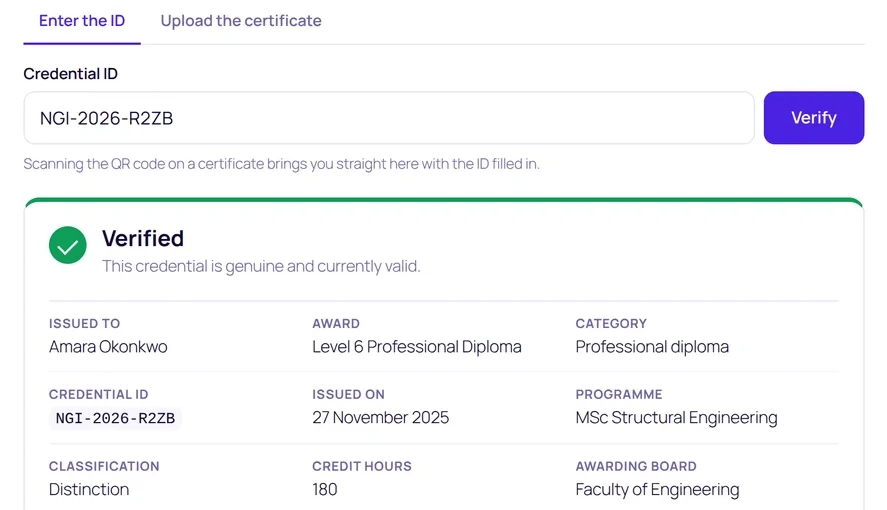
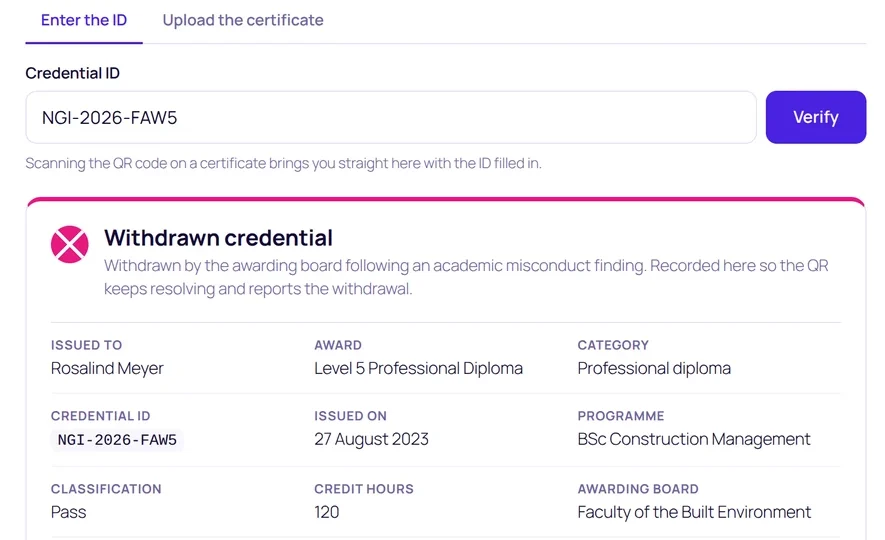
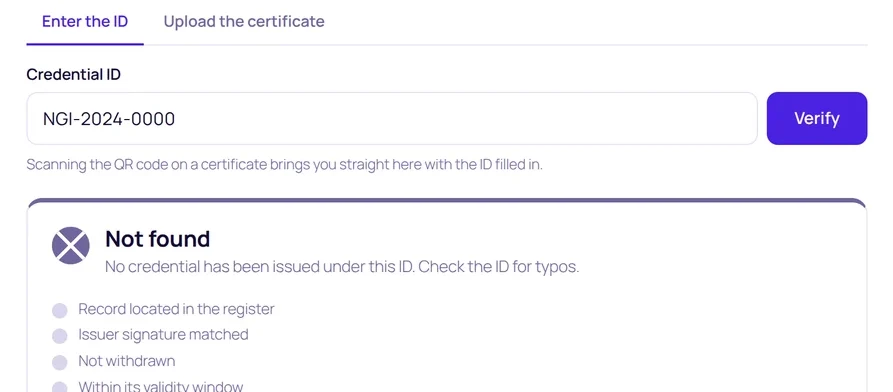
The verification log records what was checked, what the answer was, and whether it came from the portal, a QR scan or an embedded shortcode — while counting devices and countries without storing anything that identifies the person checking.

Every plan includes the full feature set plus a year of updates and support. Pick a plan by how many sites you run.
For individual creators and freelancers
For growing agencies and multi-brand teams
For client work at a steady volume
For universities, groups and regulated bodies
Seven days, on one website, with every feature unlocked and no card required. It is the same plugin the paid licences install, not a cut-down edition, so anything you build during the trial is real work rather than a demo. Start a free trial.
Yes. Attestra stays installed and every published credential stays verifiable. What stops is access to new updates and support, so renewing keeps you on the latest version.
In your own WordPress database, on your own hosting. There's no external service holding your records, and nothing breaks if you move hosts.
A key is registered to one site and only works on that site. If you are moving to a new domain, rebuilding, or shifting to a different server, email us with the old address and the new one and we will move the key across for you.
Yes. The lookup form is a shortcode, so it drops into Elementor, WPBakery, Divi, Beaver Builder or the block editor like any other element. Attestra also reads your accent colour from your page builder or theme and matches it automatically.
No. An uploaded file only decides which record to look up — your register decides the answer. A forged or edited certificate resolves to whatever the register actually says, and nothing put inside a file can change that.
That's the point. They scan the QR code, type the credential ID, or upload the certificate itself — and get the status straight away, with no sign-up anywhere.
Hundreds of institutions already issue credentials with Attestra — beautiful to look at, and impossible to fake without anyone noticing.
Get Attestra — from $90Instant download · 14-day refund